Choose fields
Fields are the columns of your report. Some split the rows, such as campaign or day. Others are figures, such as clicks or cost.
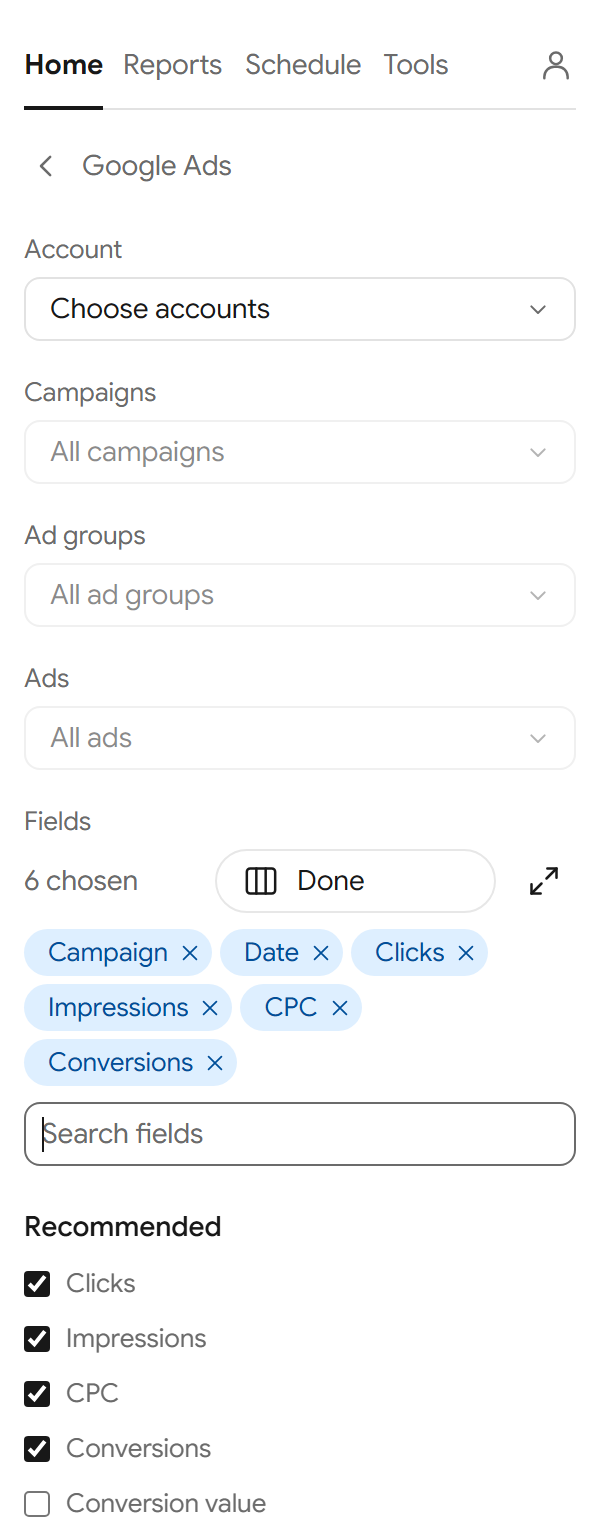
Pick fields in the sidebar
- In the report builder, under Fields, select Choose fields.
- Search for a field, or open a group, and tick the fields you want.
- Select Done.
Each chosen field shows as a chip. Select × on a chip to take it out.
Set the column order
The order of the chips is the order of the columns in your sheet. Drag a chip to move it, or select it and use the left and right arrow keys.
Use the larger editor
- Select the expand button next to Choose fields.
- A larger window opens. Groups are on the left, with Recommended first. Search and tick fields in the middle.
- Your fields are listed on the right. Drag them, or use ↑ and ↓, to set the order. Select × to take one out.
- Select Apply to use them, or Cancel to leave the report as it was.
Currency
Money cells are formatted in each account's own currency. The currency is written as a column of its own only when you choose it as a field. Figures in different currencies are never added together.